
Change your site's address
The address you share with guests, like ana-e-rui.joinvows.com, and how to change it.
2 min readUpdated 5 October 2026
In a nutshell
- In Settings, Your site, change the Site address and press Save.
- The old address stops working. Change it before you share it.
Your address is chosen when you create the site, from your names. You can change it whenever you like, but it's best to do so before sending it to guests.
- 1
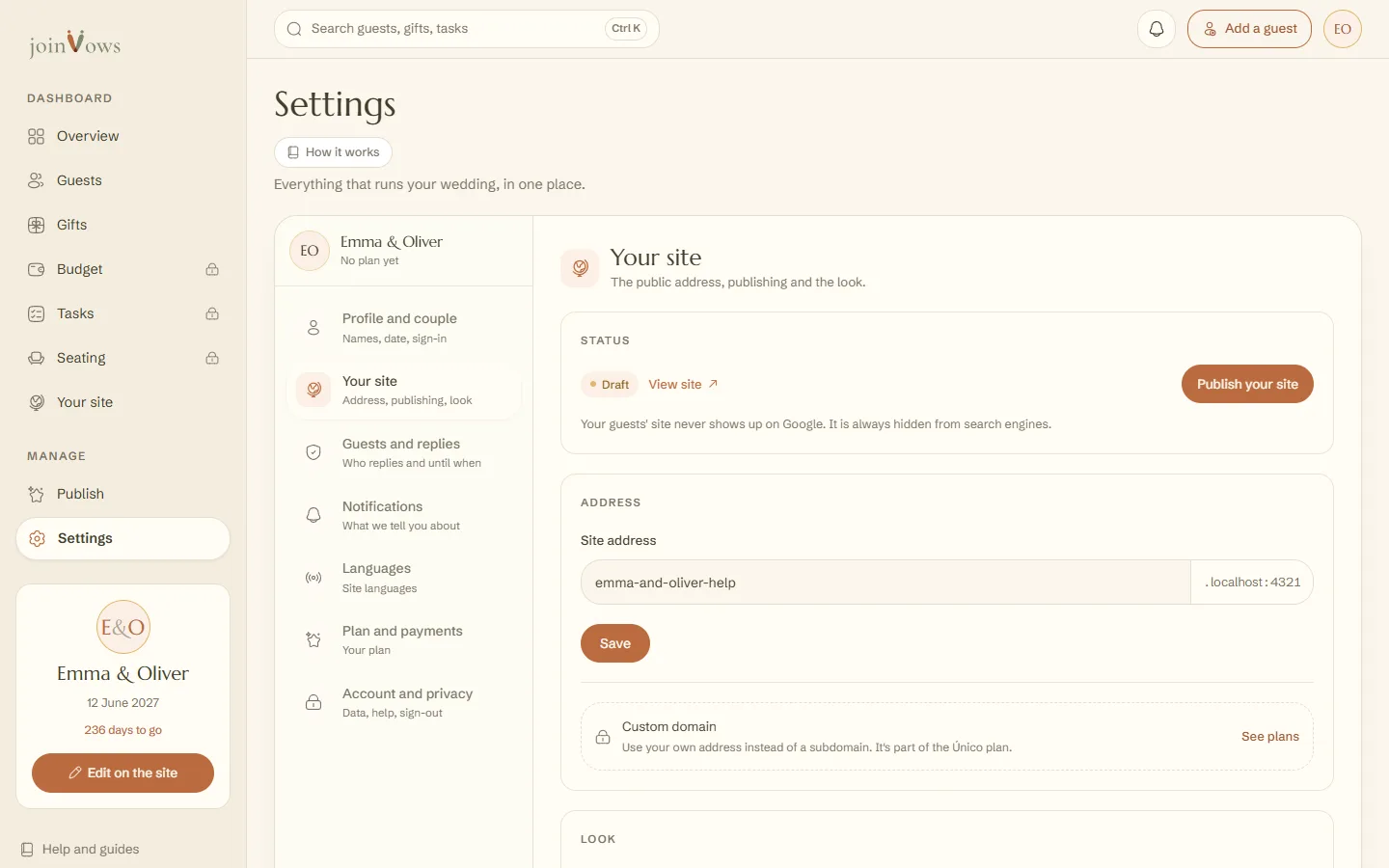
Open Settings, Your site
In your dashboard, press Settings and then Your site.
- 2
Type the new address
Under Site address, type the part before .joinvows.com. Spaces become hyphens and accents are removed for you.
- 3
Save
Press Save. Address updated. appears and the site now opens at the new address.
- Between 3 and 40 characters: letters, numbers and hyphens.
- If another couple already has it, you'll see That address is already taken. Try another, for example with the year.
- Changing your names on the cover does not change the address.
FAQ
Does the site show up on Google?
No. Couple sites don't appear on Google. Only people with the address can find it.
Can I go back to the old address?
Yes, if nobody has taken it in the meantime. Type it again and press Save.
Did this guide help?
Don't have a site yet?
Create yours in two minutes. Free until you decide to publish.
Create our site (opens in a new tab)