
Publish your site and pay
Choosing a plan, the ways to pay and what happens next.
3 min readUpdated 18 October 2026
In this guide
In a nutshell
- In the editor, press Publish, choose a plan and pay.
- You pay once, by card, MB WAY or Multibanco. The site goes live right after.
When your site looks the way you want, press Publish in the editor. You pay once, with no monthly fees.
Before you pay, confirm your account email with the link we sent you. If you have not yet, the publish page says so above the pay button, with Send the email again, and the button only works once you have confirmed. If you sign in with Google, your email is already confirmed. See Confirm your account email.
- 1
Choose your plan
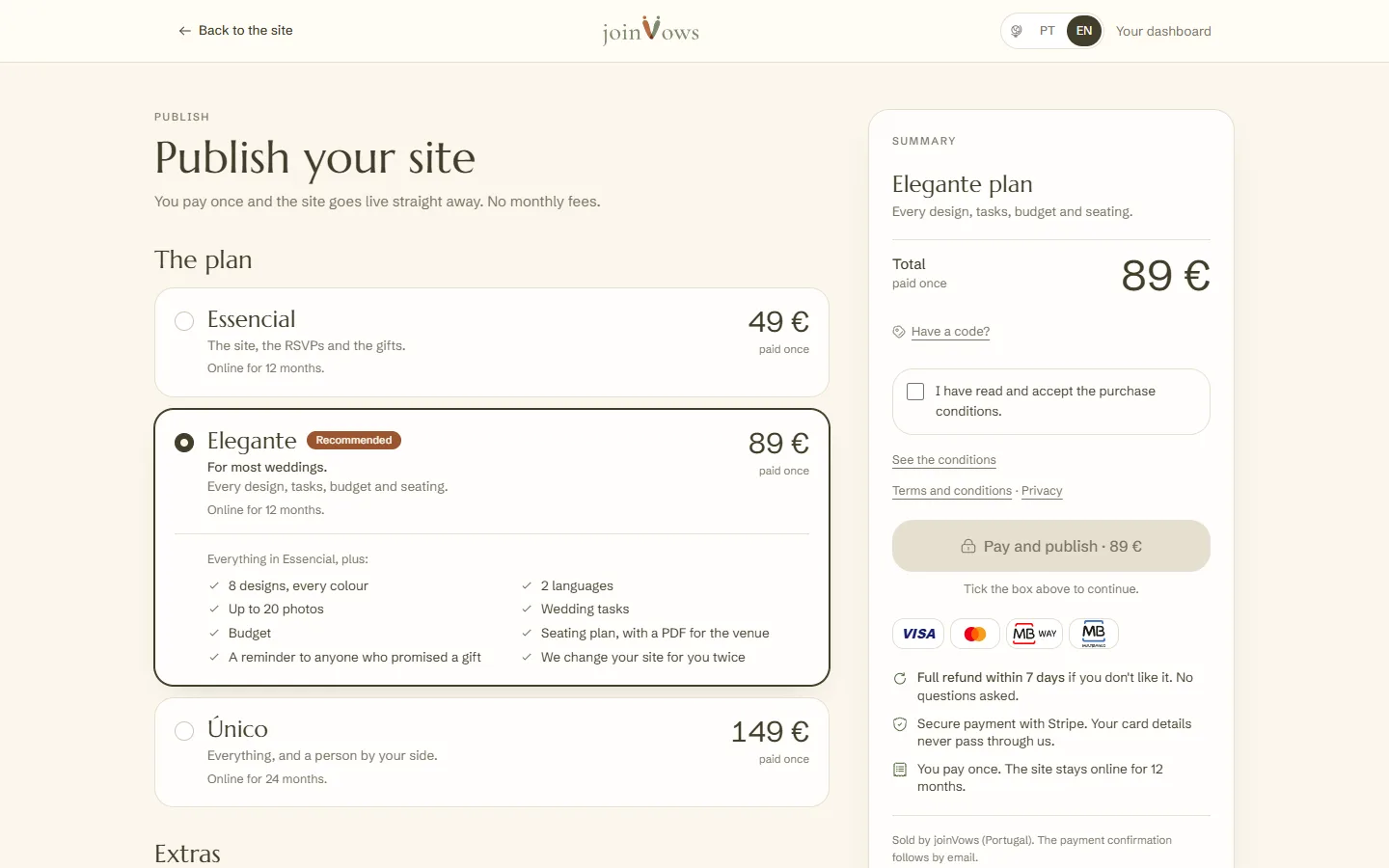
The three plans come first, from Essencial to Único. Elegante, the one we recommend for most weddings, is already chosen, unless you picked another plan on our website. Tap a plan to see everything it includes. Extras, such as an extra round of changes, are optional.
- 2
Accept the conditions and pay
Tick the conditions box and press Pay and publish. You can pay by card, MB WAY or Multibanco. On Único, Klarna too.
- 3
Your site goes live
With a card or MB WAY, the site goes live within seconds. With Multibanco, you get a reference and the site goes live once the bank confirms the payment.
Discount codes
Do you have a code from one of our campaigns? In the summary, next to the total, press Have a code?, type it and press Apply. The discount shows on its own line and the total changes straight away.
- A code can be a percentage, an amount in euros, or make the purchase free. If the total comes to 0 €, the site goes live without a payment step.
- When you change plan, the code comes off the difference you pay.
- When the first-couples offer is running, it applies by itself to your first plan purchase. It does not add up with a code: the bigger discount applies.
- If you ask for a refund, we return what you actually paid. A 0 € purchase has nothing to refund.
Within the next 24 hours we take a look at your site. If anything could be better, we leave a note on your dashboard's Overview.
FAQ
Is there a monthly fee?
No. You pay once and nothing renews automatically.
How long does Multibanco take?
The site goes live when the bank confirms the reference payment.
Our code does not work. Why?
The message under the field says why: the code has ended, it has been used the maximum number of times, you have already used it, or it does not apply to the chosen plan. If you think it is a mistake, write to support@joinvows.com.
What if we don't like it?
We refund everything in the first 7 days. You ask for it in Settings, under Plan and payments. See The 7-day refund.
Did this guide help?
Don't have a site yet?
Create yours in two minutes. Free until you decide to publish.
Create our site (opens in a new tab)