
How to RSVP on the couple's site
A guide for guests: finding your invitation, replying and changing your reply.
2 min readUpdated 10 October 2026
In a nutshell
- Open the couple's site and press RSVP.
- Type your name, pick your invitation and reply.
The couple sent you the link to their wedding site. Replying takes less than a minute.
- 1
Open the site and press RSVP
The button is at the top of the site and in the RSVP section.
- 2
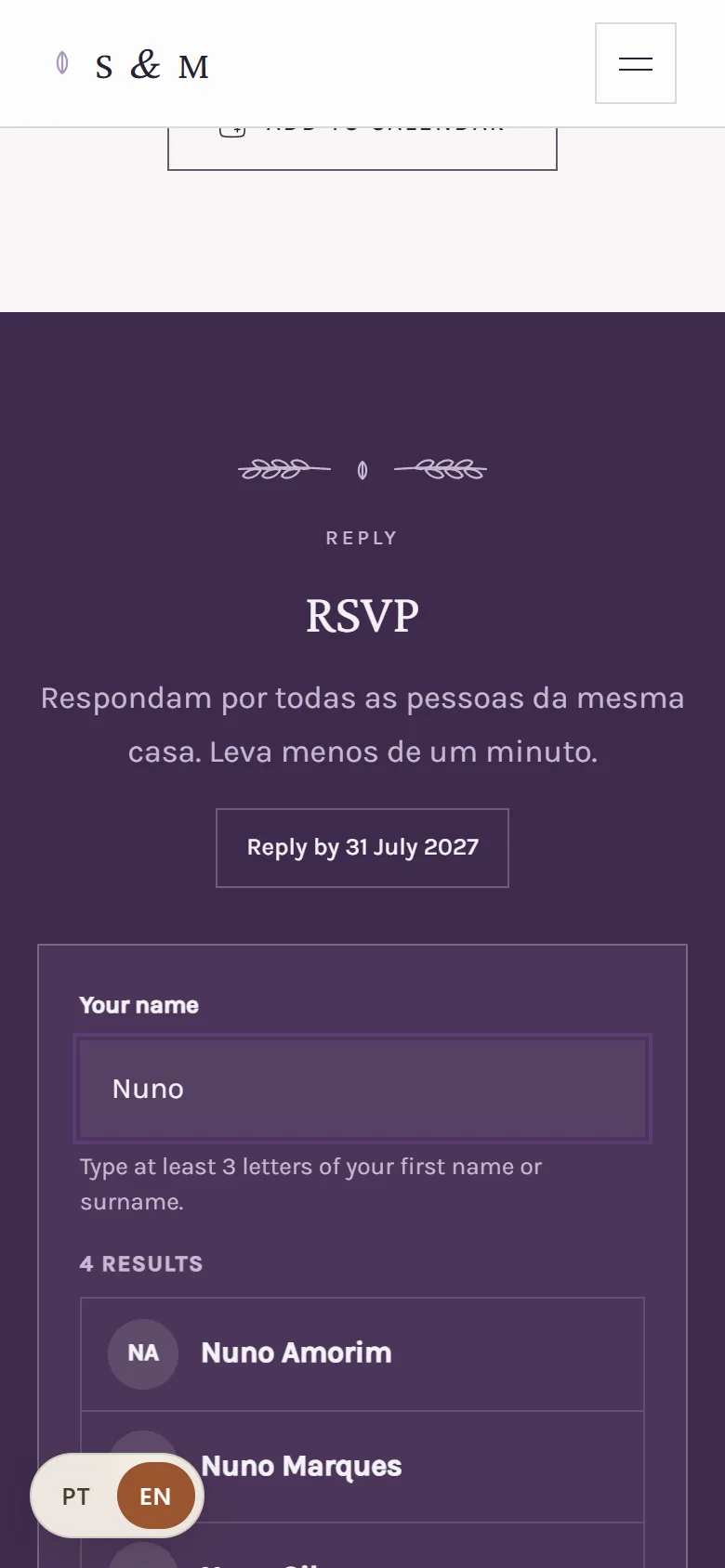
Type your name
Type at least the first 3 letters of your first name or surname, and choose your name from the list. The list shows up to 4 names: if you are not there, type more letters or your full name.
- 3
Reply for yourself and whoever comes with you
Say whether you're coming and add any dietary needs. You can also reply for the other people on your invitation.
Can't find your name? Check how it's spelt on the invitation or search by surname. If it still doesn't appear, talk to the couple. Some sites show Register my reply: type your name and who comes with you. If you leave your email, you get the confirmation and a link to change your reply.
FAQ
I can't find my name. What now?
Check how it is written on the invitation or search by surname. If it still doesn't appear, talk to the couple.
Can I change my reply later?
Yes. If you replied for the whole invitation, come back to the site on the same phone or computer and press Change my reply. If you left your email, the link in the confirmation works too.
Did this guide help?
Don't have a site yet?
Create yours in two minutes. Free until you decide to publish.
Create our site (opens in a new tab)